


FireMoon Harness: what it is and how to start
MintFlow's desktop coding agent explained: Agent and Chat modes, every provider plus local models, safety controls, Claude Mode, the iOS companion and what each plan costs
On this page
- FireMoon Harness at a glance
- What is FireMoon Harness?
- Who is FireMoon Harness for?
- Agent mode vs Chat mode
- Which models and providers does FireMoon Harness support?
- Local models
- Subagents, worktrees and parallel work
- How does FireMoon Harness keep the agent safe?
- Auto permission mode (Pro)
- What leaves your computer?
- Claude Mode: using your Claude subscription
- The iOS companion (Max)
- Does FireMoon Harness save tokens?
- FireMoon Harness pricing: Free vs Pro vs Max
- Platforms and current version
- How do you start with FireMoon Harness?
- How does FireMoon Harness compare with Claude Code and Codex?
- Limitations to know about
- Frequently asked questions
FireMoon Harness is MintFlow's desktop AI coding agent for macOS and Windows. It reads your code, edits it, runs commands and checks its own work, using whichever model you bring: a cloud provider with your own key, your Claude subscription, or a local model through Ollama or LM Studio.
The Free plan is the full agent, with no account. Pro costs €20 once and Max costs €5 a month. One thing to know before you plan around it: version 0.1.0 is due on 20 December 2026, and the download links aren't live until then.
FireMoon Harness at a glance
| Details | |
|---|---|
| Made by | MintFlow Technologies |
| What it is | A desktop AI agent: Agent mode for code, Chat mode for the rest of your computer |
| Platforms | macOS 14 or later (Apple silicon and Intel), Windows 10 or 11 (64-bit); iOS 26 companion on Max; Linux "coming soon" |
| Version | 0.1.0, due 20 December 2026 |
| Models | Ten built-in providers (eight cloud, two local) plus custom endpoints; no default provider |
| Price | Free; Pro €20 one-time; Max €5 a month (first month €3) |
| Account | None on Free; Pro and Max use a FireMoon account |
| Telemetry | None, according to the privacy page |
| License | Proprietary, not open source |
What is FireMoon Harness?
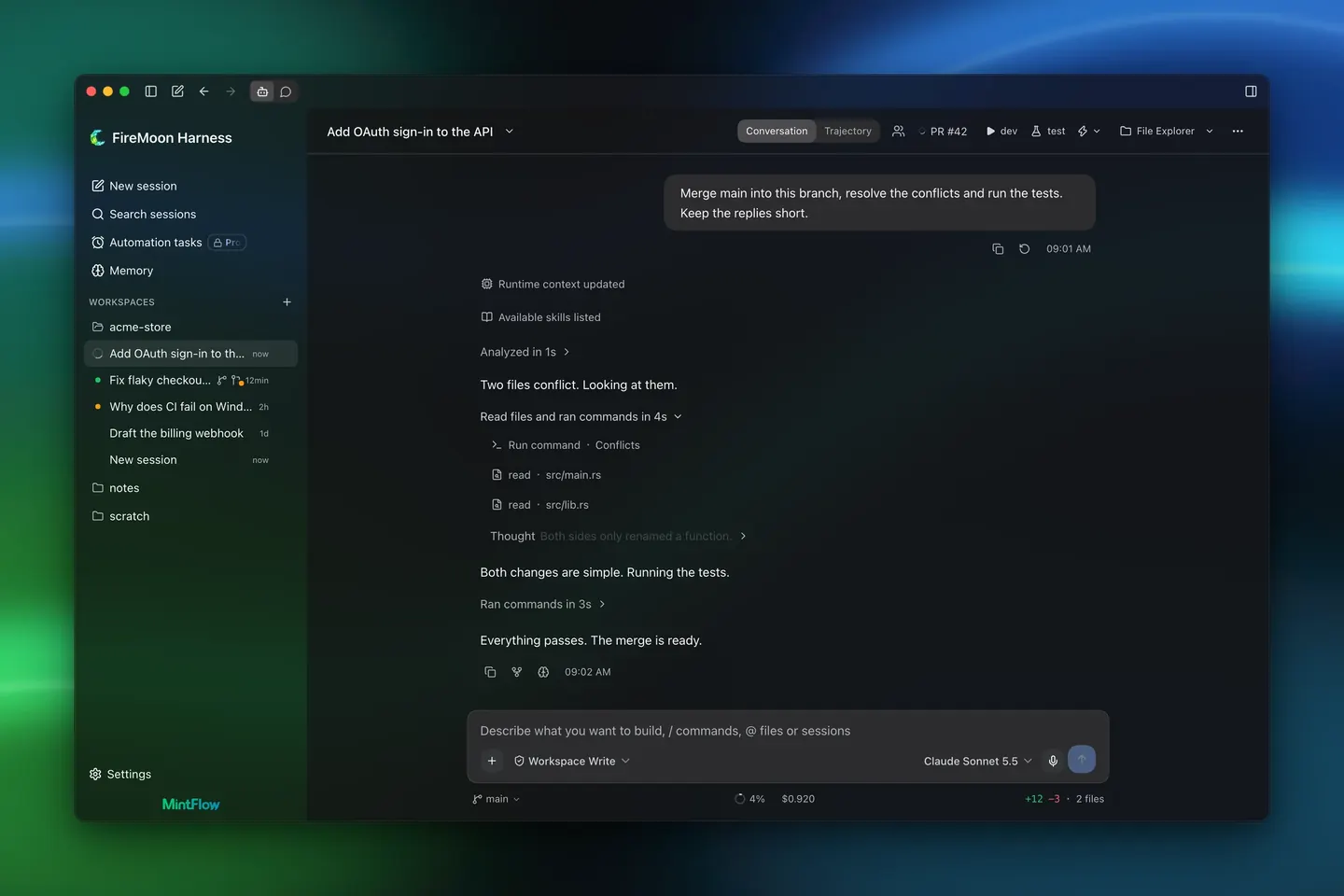
FireMoon Harness is a single desktop app that works as two tools. In Agent mode it's a coding agent built around your projects: it plans, edits files, runs commands and tests, and shows a diff of what it changed. In Chat mode it's a general assistant that can also look into your computer, for questions like why a disk is full or what's using a busy port.
MintFlow says the agent core is compiled Rust in a Tauri app, with the interface drawn by the webview your operating system already ships (WebKit on macOS, WebView2 on Windows) rather than a bundled copy of Chromium.
The About page describes it as one focused application maintained by an independent developer. It's proprietary: the Licence page says it isn't open source for now and will probably become open source one day, with no date attached.
Who is FireMoon Harness for?
The site's use cases name four groups: developers who want several models, parallel subagents and pull request handling in one window; power users who want scheduled automations, MCP servers or models on their own hardware; people who want everyday help from Chat mode; and anyone with file chores, like converting a folder of documents to PDF or renaming photos by date.
It suits you best if you already pay for one or more model providers, want to try local models, or want a desktop agent with no telemetry. It's a poor fit today if you work on Linux, or if you need something you can install right now.
Agent mode vs Chat mode
A switch in the titlebar flips between the two (Mod+1 for Agent, Mod+2 for Chat, where Mod is Cmd on macOS and Ctrl on Windows). Each mode keeps its own sidebar, sessions and scroll position, and both share the same model picker, access modes and cost meter.
| Agent mode | Chat mode | |
|---|---|---|
| Built around | Projects (workspaces) and sessions | Standalone chats that start in your home folder |
| Tools | The full set: terminals, background jobs, run_code, LSP, MCP servers, subagents |
A smaller set: shells and the terminal, file read, search and edit, the web, images, questions, a to-do list |
| Default access | Workspace Write | Read Only |
| Extras | Workbench tabs (Files, Review, Terminal, Browser, Pull requests), Plan mode, worktrees, Rewind, project notes | Deep Research reports, answer regeneration |
Agent mode also carries the features that make long jobs workable. Plan mode has the agent write a plan and wait for your approval before it changes anything. "Stay on task" keeps it working through a roadmap file phase by phase until everything is done and tested. The Review tab lets you comment on lines, revert or stage single changes, and send all your comments back to the agent at once.
Which models and providers does FireMoon Harness support?
Ten providers are built in, and the docs list them alphabetically so none is promoted:
- Cloud: Anthropic, DeepSeek, Google (Gemini), Mistral, Moonshot, OpenAI, OpenRouter and Z.ai
- Local: Ollama and LM Studio
You can also add a custom provider that speaks the OpenAI-compatible chat completions API, Anthropic's Messages API or the Gemini API. Every provider works in Agent mode, Chat mode and subagents.
Cloud models need your own API key, and you pay the provider directly. FireMoon stores keys in a credentials.json file in its data folder that only your user account can read (unless you turn on encrypted key sync to your own database), and it also picks up keys from environment variables such as ANTHROPIC_API_KEY or from a .env file.
A few model features apply everywhere:
- Model fallback. You set a chain of backup models. If a call fails with a server error, rate limit, refusal or missing model, the turn continues on the next one.
- Prompt caching on Anthropic, and on
anthropic/*models through OpenRouter. - Effort and context window controls per model, plus pins for your favorites.
- Auto routing (Pro). Pick Auto and FireMoon rates each prompt as simple, moderate or complex, filters the models that can handle it and picks one in your chosen price band (Cheapest, Balanced or Most expensive). The default classifier runs on your machine and sends nothing.
One mismatch to watch: the Providers page says the built-in catalogs list current models only, but FireMoon's OpenAI page lists GPT-5, GPT-5 mini and GPT-4.1, while OpenAI's own docs now lead with the GPT-6 series. OpenAI is one of the providers whose list FireMoon doesn't fetch from the provider, so check the model picker once the app ships.
Local models
Ollama and LM Studio are peers of the cloud providers: no key, no cost on the meter, and prompts go only to the server on your machine. You can also point FireMoon at Ollama on another computer through a Cloudflare tunnel. The setup, including the context-window setting Ollama needs, is in our guide to running local models in FireMoon Harness.
Subagents, worktrees and parallel work
FireMoon can hand work to background subagents, each in its own git worktree and branch. Nothing merges until you approve it. A Worktree toggle under the composer runs a whole session in its own worktree, and split view puts two live conversations side by side, for example to run two models on the same task.
Other agents can join in too. The changelog says Claude Code, Codex and agents that speak the Agent Client Protocol (ACP) can run as subagents, and it lists "Teams and workflows" without documenting them further. In the other direction, Zed, JetBrains IDEs and other ACP editors can run FireMoon's own agent through a firemoon acp command, with the sessions showing up in the app.
If you already use Claude Code, much of your setup carries over: permission rules in Claude Code's syntax, command hooks from Claude Code and Codex, .claude agents, slash commands and skills, and the skills, agents, hooks and MCP servers of installed Claude Code plugins. MCP servers connect over stdio, HTTP or SSE, with OAuth.
How does FireMoon Harness keep the agent safe?
Every session has one of four access modes, picked next to the model in the composer:
| Mode | What the agent can do |
|---|---|
| Read Only | Read and inspect; every write needs your approval, even inside the project |
| Workspace Write | Write inside the project folder and temp; anything wider needs approval |
| Auto (Pro) | Run commands and edit files without routine approval, with a reviewer checking each tool call |
| Full access | Run commands and edit files without approval and without a sandbox |
New agent sessions start in Workspace Write and new chats in Read Only. Full access and Auto ask you to confirm the risk before they turn on.
In Read Only and Workspace Write, shell commands run inside an OS sandbox, and if the sandbox can't start, the command doesn't run. When the agent needs more, an approval card offers Reject or Allow once, and where a rule fits, Allow for this session or Always allow in this project.
Permission rules use Claude Code's permissions syntax (deny, ask, allow), so an existing .claude/settings.json works unchanged. Deny beats ask, ask beats allow, and a deny rule holds even in Full access. A cloned project's own allow rules only apply after you trust the project, so a repository can't approve its own commands.
Rewind restores the code, the conversation or both to before any of your messages. The docs are clear about its limits: it doesn't undo shell side effects, subagent worktrees or external processes, and it isn't available while a turn is running.
Secret masking hides pasted keys, tokens and passwords on screen. The model still receives the real text, and the docs say it isn't a security boundary.
Auto permission mode (Pro)
Auto is for letting the agent work without approval prompts. Before each tool call, including the calls a program makes inside run_code, the session's own model reviews it. Allowed calls run; blocked calls go back to the agent with the reason so it can try another approach. If the review itself fails, the call doesn't run. You're only asked after the third block in a row or the twentieth in a session.
The trade-offs are documented plainly. Auto runs without the sandbox, each review costs extra tokens, and because the reviewer is a model it can wrongly allow or block an action. Deny rules still apply, and Rewind is there for code changes that slip through. If your plan stops including Pro features (a lapsed Max subscription without Pro, for example), a session in Auto drops back to Workspace Write at its next tool call and asks you first.
What leaves your computer?
FireMoon's privacy page says the app sends no telemetry, usage data, crash reports or session content to MintFlow. Sessions, memory, notes, settings and cost tracking stay in its data folder. Voice input is recognized on your computer, and image reading for text-only models runs locally.
What does go out, by the site's own list:
- Your prompts and context to the model provider you pick, under that provider's terms. With Ollama or LM Studio, nothing leaves your hardware.
- Tool traffic, such as web search, web fetch or MCP servers contacting their own services.
- Update checks, which read a public release file and can be turned off in Settings.
- A one-time speech-model download from Hugging Face, only when you turn on voice input.
- License validation on Pro and Max (a sign-in token and a random device ID).
- Sync, if you turn it on, which goes to your own Postgres database with no FireMoon server in between.
The changelog adds one more for Max: iPhone push alerts pass through MintFlow's push relay, which it says stores nothing, and the alerts carry no session content.
Claude Mode: using your Claude subscription
Claude Mode (Pro) runs a session on your Claude subscription instead of an API key. FireMoon starts the Claude Code CLI you already have installed and signed in, and draws its own interface on top: tool cards, diffs and approvals, plus Rewind and split view. You turn it on per session from the composer's + menu.
Your Claude Code agents, skills, hooks and MCP servers come along. A plan meter shows how full your five-hour and weekly Claude limits are, and how much of that FireMoon used. The model picker lists the current series (Fable 5.2, Opus 5.5, Sonnet 5.5 and Haiku 5.5) and puts every other model under Other models. FireMoon's model fallback doesn't apply here, because Claude Code handles its own.
You'll need a Claude plan that includes Claude Code. Anthropic's pricing page lists it on Pro ($20 a month, or $200 a year), Max and Ultra, but not on the free plan. For how Claude Code itself compares with OpenAI's agent, see Codex vs Claude Code.
The iOS companion (Max)
The iPhone app pairs with your desktop through your own sync database: on the desktop, open Settings → Sync → Remote devices, choose Pair iPhone and scan the QR code. From the phone you can start and drive desktop sessions, answer approvals and questions, read what a session changed and comment on lines, change models and modes, and manage automations and settings.
It can also run a chat on the phone itself, with web search, web fetch and Deep Research, even when the desktop is off. The iOS page says remote devices never reach terminals, files, git, the browser or your credentials. It needs iOS 26.
One inconsistency: the changelog lists push notifications (including Approve and Deny from the alert, with Face ID) as part of 0.1.0, but also lists "iOS push notifications" under Coming next, so it's unclear whether they arrive with the first release.
Does FireMoon Harness save tokens?
FireMoon ships three token savers, all on by default: tools on demand (a small core set of tools per request, the rest loaded when needed), Context Compression (bulky JSON, logs, search results and diffs shrunk before the model sees them) and a Token Economizer that learns which tools a project never uses.
MintFlow's own benchmark, published on 11 November 2026 and run on Nvidia's Nemotron 3 Ultra through OpenRouter's free tier, reports 63% fewer tool tokens per request with tools on demand (12,713 down to 4,671). Turning on both Context Compression and the Token Economizer cut input tokens by 37% and the estimated cost by 33% at Claude Sonnet 5.5 rates. Those two figures cover the six of seven tasks that behaved consistently, and all six passed in every setup; the seventh, a rename across 28 files, ran out of turns in most setups. The write-up's own caveats apply: one model, one run per setup, small tasks, and compression measured in its full mode rather than the shipped "Lossless only" default, which saves less on logs and search results.
FireMoon Harness pricing: Free vs Pro vs Max
| Free | Pro | Max | |
|---|---|---|---|
| Price | €0 | €20 one-time, lifetime updates | €5 a month (first month €3) |
| Agent and Chat modes, every provider, local models, Deep Research, split view, subagents, desktop cloud sync | Yes | Yes | Yes |
| Auto routing and Auto permission mode | No | Yes | Yes |
| Automations (scheduled tasks) | No | Yes | Yes |
| Automatic fixes for failing pull request checks | No | Yes | Yes |
| Claude Mode | No | Yes | Yes |
| Takeover mode | No | When it ships | When it ships |
| iOS companion and pre-release updates | No | No | Yes |
| Account | None | FireMoon account | FireMoon account |
Model usage is never included: you pay providers directly, with your own keys or subscription.
The licensing details are worth reading before you buy:
- Pro signs in once, fetches a signed license and then works offline for good.
- Max re-checks around each renewal. If a renewal isn't confirmed, it keeps working until three days after the renewal date, then falls back to Pro (if you own it) or Free.
- One account covers up to five signed-in desktops; other devices get the license through your sync database.
- No refunds. The pricing page says purchases are final, while your statutory rights are unaffected. You can cancel Max any time, and it runs to the end of the paid month.
Checkout happens on the MintFlow account site, and you then sign in from Settings → Account in the app.
Platforms and current version
FireMoon 0.1.0 is listed as one universal disk image for macOS 14 or later (Apple silicon and Intel) and an installer for 64-bit Windows 10 or 11. The iOS companion is listed for the App Store and needs Max and iOS 26, and Linux is marked coming soon with no date.
MintFlow has set 20 December 2026 as the release date for 0.1.0. (The download page and changelog may still say the date is to be announced until they're updated.) The About page's road to 1.0 shows the project starting in October 2026, with the milestones after 0.1.0 still to be announced. Once installed, the app checks for updates and asks before installing anything.
How do you start with FireMoon Harness?
Once the download links go live, the install docs describe a short path:
- On macOS, open the disk image and move FireMoon Harness to Applications. On Windows, run the installer.
- On first launch, a setup dialog walks you through optional steps: pick a provider (cloud providers ask for a key, Ollama and LM Studio don't), grant Full Disk Access on macOS if you want, set a name, and download the offline voice model if you want dictation.
- Make sure the titlebar switch is on Agent, and add a project folder with the + next to the workspaces in the sidebar.
- Start a session (
Mod+N), pick a model in the composer, and check that the access mode reads Workspace Write. - Type the task and send it. The commands, file reads and diffs appear under each reply, and the cost and context meters show what the turn used.
You can rerun the setup dialog later from Settings → Models → Run setup again.
How does FireMoon Harness compare with Claude Code and Codex?
FireMoon's home page has a comparison table against seven other tools, with competitor details MintFlow says it checked on 19 November 2026. The rows below are only the points we could also confirm on Anthropic's and OpenAI's own pages on 28 November.
| FireMoon Harness | Claude Code | OpenAI Codex | |
|---|---|---|---|
| Models | Ten built-in providers, cloud and local, plus custom endpoints | Claude models only | OpenAI by default; other providers through config, and Ollama or LM Studio with --oss |
| Telemetry | None, per its privacy page | Usage metrics on by default with the Claude API; DISABLE_TELEMETRY=1 turns them off |
Anonymous usage and health data on by default; [analytics] enabled = false turns it off |
| Price | Free; Pro €20 once; Max €5 a month; model usage paid separately | Needs a paid Claude plan (from $20 a month) or API billing | Included in ChatGPT plans from Free and Go ($8) up, or API-key billing |
The bigger difference is maturity. Claude Code and Codex are shipping products from the labs that make the models, while FireMoon is a 0.1.0 release that hasn't shipped yet. For the wider field, see the best AI coding agents in 2026, where FireMoon isn't ranked.
Limitations to know about
- Not downloadable yet. Version 0.1.0 arrives on 20 December 2026.
- Takeover mode is coming soon. Letting the agent see and operate your desktop apps is a Pro feature that hasn't shipped.
- No Linux build yet, and the iOS companion needs Max and iOS 26.
- Closed source, from an independent developer.
- Auto mode isn't a guarantee. The reviewer is a model, it costs tokens, and Auto runs without the sandbox.
- Rewind has gaps: shell side effects, subagent worktrees and external processes aren't undone.
- Docs that lag: the OpenAI catalog lists older models, and the changelog contradicts itself on iOS push notifications.
- No refunds on Pro or Max.
Frequently asked questions
Is FireMoon Harness free?
Yes. The Free plan includes the full agent, Chat mode, every provider and local models, with no account. Pro is a one-time €20 and Max is €5 a month, and you pay model providers separately in every case.
Can I download FireMoon Harness yet?
Not yet. Version 0.1.0 for macOS and Windows is due on 20 December 2026, and the download page says the links go live with that release.
Does FireMoon Harness work with local models?
Yes. Ollama and LM Studio are built-in providers that need no key, and you can also use Ollama on another machine through a Cloudflare tunnel. The cost meter counts local models as free.
Can I use my Claude subscription in FireMoon Harness?
Yes, with Claude Mode on Pro or Max. It runs your installed, signed-in Claude Code CLI with FireMoon's interface on top, so you need a Claude plan that includes Claude Code.
Does FireMoon Harness collect telemetry?
MintFlow's privacy page says no: no telemetry, usage data, crash reports or session content go to MintFlow. Update checks, license validation on paid plans and, on Max, push alerts through MintFlow's relay are the documented exceptions.
Does FireMoon Harness run on Linux?
Not yet. FireMoon lists Linux as coming soon, without a date; version 0.1.0 targets macOS 14 or later and Windows 10 or 11 (64-bit).
Sources
- FireMoon Harness home page, MintFlow Technologies
- Features, FireMoon Harness
- Pricing, FireMoon Harness
- Upgrade, FireMoon Harness
- Download, FireMoon Harness
- Changelog, FireMoon Harness
- About, FireMoon Harness
- Use cases, FireMoon Harness
- iOS companion, FireMoon Harness
- Privacy, FireMoon Harness
- Licence, FireMoon Harness
- Same work, a third fewer tokens, FireMoon Harness
- Install and first run, FireMoon Harness docs
- Agent mode and Chat mode, FireMoon Harness docs
- Permission modes, FireMoon Harness docs
- Providers, FireMoon Harness docs
- OpenAI provider, FireMoon Harness docs
- Auto routing and model fallback, FireMoon Harness docs
- Local models, FireMoon Harness docs
- Remote Ollama, FireMoon Harness docs
- Plans & pricing, Anthropic
- Data usage, Claude Code Docs
- Model configuration, Claude Code Docs
- Advanced configuration, Codex docs, OpenAI
- Codex pricing, OpenAI
- Codex models, OpenAI
- Products, MintFlow
Was this helpful?
Thanks, noted. It helps decide what gets updated first.


